6 Cutting-Edge Features of preFlight Slicer That Will Transform Your 3D Prints
Are you ready to push your 3D printing projects to the next level? Meet preFlight Slicer, a free and open-source tool that’s packed with innovative processing improvements and fresh twists on classic slicing techniques. Whether you’re a hobbyist or a professional, this slicer offers features that can dramatically improve part strength, surface quality, and workflow efficiency. In this listicle, we’ll dive into six game-changing capabilities that make preFlight stand out. Click on any feature to jump straight to its details:
- 1. Interlocking Perimeters for Superior Z-Strength
- 2. Mix and Match Support Types on the Same Object
- 3. Nip & Tuck Seams for Near-Invisible Layer Starts
- 4. Emboss Images Directly onto Print Surfaces
- 5. Smart Bridging for Counter-Bored Holes
- 6. Side Preview and Full Python Runtime
1. Interlocking Perimeters for Superior Z-Strength
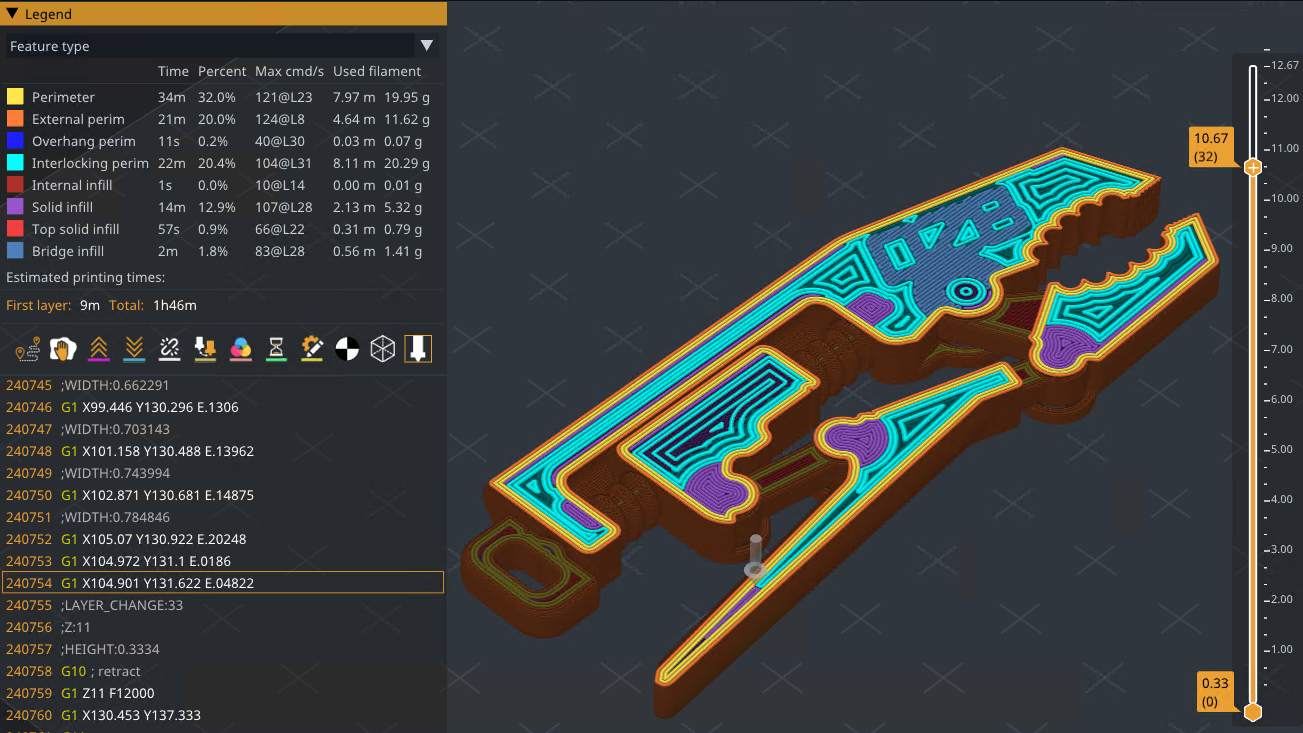
One of the most significant challenges in FDM 3D printing is the inherent weakness along the Z-axis. Traditional brick-layer patterns stagger layers vertically but still leave gaps that can cause delamination. preFlight introduces Interlocking Perimeters, a revolutionary approach that enhances layer bonding without altering layer height. By dynamically adjusting the spacing and compression between perimeters, this feature creates a mechanical interlock that significantly boosts part strength in the Z direction. The result is a sturdier, more durable print that behaves like a single solid piece. This is made possible thanks to the Athena perimeter generator, which offers greater control over extrusion paths. If you’ve been looking for a way to create functional parts that can withstand stress, this feature alone makes preFlight worth trying.
2. Mix and Match Support Types on the Same Object
Every 3D model has unique overhang requirements, and using a one-size-fits-all support strategy often leads to wasted material or poor surface finish. With preFlight, you can now mix and match different support types on the same object. For example, you can use tree supports for delicate bridges and grid supports for heavy overhangs, all within a single print job. This flexibility allows you to optimize each section of your model for quality, speed, or ease of removal. The slicer seamlessly processes the transitions, ensuring that supports are generated exactly where needed. Whether you’re printing intricate figurines or robust mechanical parts, this feature saves time and filament while improving outcomes. It’s a powerful tool for anyone who values precision and efficiency.
3. Nip & Tuck Seams for Near-Invisible Layer Starts
One of the most common eyesores in 3D printing is the seam left where each layer begins and ends. These tiny bumps can ruin an otherwise smooth surface, especially on curved or cylindrical objects. preFlight tackles this with a clever technique called Nip & Tuck Seams. Instead of randomly placing layer start points, this feature intelligently hides them by tucking them into corners, edges, or less visible areas. You can even fine-tune the algorithm to align seams along specific contours or geometries. The result is a vastly cleaner finish with minimal post-processing. Say goodbye to sanding and filler—your prints will look professional straight off the bed. This is a game-changer for display models and mechanical parts where aesthetics matter.
4. Emboss Images Directly onto Print Surfaces
Want to add logos, textures, or patterns to your prints without manual post-processing? preFlight allows you to emboss images directly onto the surface of your 3D model. Simply upload a grayscale image (like a company logo or a decorative pattern), and the slicer converts it into a height map that modifies the top or side layers. You get a real-time preview of how the embossed design will look, so you can adjust depth, scale, and positioning before slicing. This feature is perfect for branding, custom gifts, or adding tactile details to functional parts. The image is integrated into the G-code, meaning no extra steps are needed. It’s a simple yet powerful way to personalize your creations.
5. Smart Bridging for Counter-Bored Holes
Counter-bored holes (where the top of a hole is widened to recess a screw head) are common in engineering prints, but they often require support structures that waste material and time. preFlight introduces Smart Bridging that automatically detects counter-bored features and creates temporary bridges across the top of the hole. These bridges act as a support-free base for the layers above, then are easily broken away after printing. The algorithm optimizes bridge length and overlap to ensure a clean finish without sagging. This not only reduces material usage but also speeds up print time. For makers and engineers who frequently design functional objects with fasteners, Smart Bridging is a practical time-saver that also improves part integrity.
6. Side Preview and Full Python Runtime
preFlight doesn’t stop at slicing; it also enhances your workflow with unique tools. First, the Side Preview allows you to view a sliced object from the side, rather than only by individual layers. This gives you a holistic view of how layers stack, helping you spot potential issues like overhangs or weak zones before you hit print. Additionally, preFlight embeds a full Python runtime directly into the slicing pipeline. This means you can write custom scripts to automate repetitive tasks, modify G-code on the fly, or integrate with other manufacturing software. Combined with multiple export pathways (including native formats for various printers), this slicer offers unprecedented flexibility. Whether you’re a developer or a power user, these features let you tailor the slicing process to your exact needs.
These six features are just the tip of the iceberg. preFlight Slicer is a dynamic, open-source project that keeps evolving—thanks to its active community on GitHub. We encourage you to download it, experiment with Interlocking Perimeters and the other tools mentioned here, and see how they transform your prints. Let us know in the comments which feature you find most exciting, and happy printing!
Related Discussions