Building a Low-Power VPN Gateway with the ESP32: A Q&A Guide
If you’ve ever wanted to securely access your home network from anywhere without breaking the bank, the ESP32 might be your hidden gem. This Q&A explores how the MicroLink project transforms an ESP32-S3 into a full Tailscale VPN client—offering a compelling alternative to the usual Raspberry Pi Zero. We’ll cover setup challenges, performance trade-offs, and practical ways to put this tiny gateway to work.
1. What is the MicroLink project and how does it enable a VPN gateway on an ESP32?
MicroLink is a complete implementation of the Tailscale client designed specifically for the ESP32 family of microcontrollers. Tailscale creates a secure, zero-configuration VPN mesh network using WireGuard encryption. By porting this client to the ESP32, MicroLink allows the chip to act as a VPN gateway—authenticating and routing traffic between your remote device and your home network. Unlike typical VPN setups that require a full Linux system (like a Raspberry Pi), MicroLink squeezes the entire client into the ESP32’s limited resources, making it possible to run a lightweight but functional gateway. The project handles the tricky TLS handshakes and maintains the encrypted tunnel so that other devices on your local network can be reached securely without exposing them to the open internet.
2. How does an ESP32-based VPN gateway compare to a Raspberry Pi solution?
The most obvious difference is cost and power. A Raspberry Pi Zero typically draws about 1.5 W and takes 30 seconds to boot. The ESP32-S3, by contrast, consumes only about 0.5 W and boots in just two seconds—nearly instant on. Additionally, the ESP32 has no SD card to corrupt; it runs firmware from flash memory, which is far more reliable over time. However, the Raspberry Pi is much easier to set up: you can install Tailscale in minutes via the Pi’s package manager. The ESP32 route, as we’ll discuss next, required several hours of tinkering. The Pi also offers far more bandwidth, suited for tasks like streaming video, while the ESP32 only handles lightweight traffic well.
3. What were the main challenges in setting up the ESP32 as a Tailscale client?
The biggest hurdle was memory management. TLS handshakes—the cryptographic negotiations that establish a secure connection—are memory-intensive. On a stock ESP32, the available RAM can easily run out during this process, causing the handshake to fail. The solution was to enable the chip’s external PSRAM (pseudo-static RAM), which provides much-needed extra memory. Once PSRAM was configured, the handshake completed successfully. Setting up the development environment, compiling the MicroLink firmware, and debugging connection issues also took considerable time—far longer than the few minutes needed to set up Tailscale on a Raspberry Pi. For hobbyists comfortable with embedded programming, this is a rewarding project, but it’s not a plug-and-play solution.
4. Why is PSRAM important for running Tailscale on the ESP32?
Tailscale uses mTLS (mutual TLS) to authenticate and encrypt communication between clients. The TLS handshake process involves exchanging certificates, performing key generation, and negotiating cipher suites—all of which require temporary memory buffers. On an ESP32 without PSRAM, the available internal RAM (typically 520 KB) is quickly exhausted, especially when the TLS library allocates large structures. The MicroLink project specifically requires PSRAM to store these dynamic allocations. By enabling the ESP32’s PSRAM (usually 2 MB or 8 MB on S3 modules), the client gains enough headroom to complete the handshake and maintain the VPN tunnel reliably. Without PSRAM, the device will repeatedly fail to connect, making the gateway unusable.
5. What practical uses does an ESP32 VPN gateway offer besides remote access?
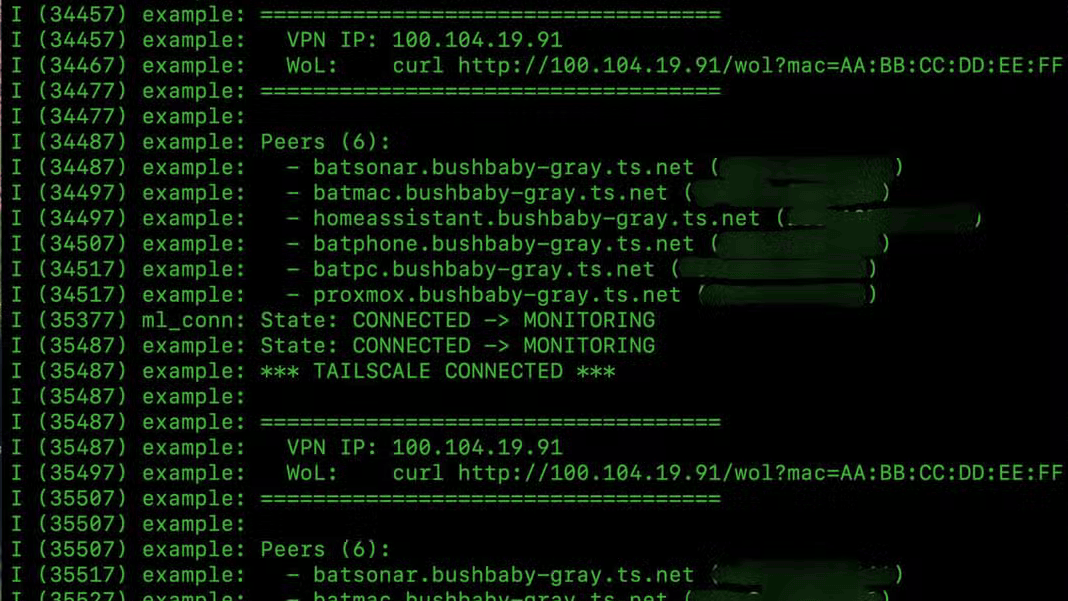
Once the VPN client is running, the ESP32 can act as an SSH jump machine. You can SSH into the ESP32, then from there jump to any other device on your home network—such as a NAS, a desktop, or a printer—without exposing those devices to the internet. Additionally, the ESP32 hosts a small HTTP server that can send a Wake-on-LAN (WoL) magic packet. This lets you wake up a sleeping computer on your local network simply by visiting the ESP32’s web interface. These features are particularly useful for remote administration, file access, and power management, all while keeping your network secure behind the VPN.
6. Can the ESP32 VPN gateway handle streaming video or heavy traffic?
No—the ESP32’s bandwidth is limited. Even with a good Wi-Fi connection, the chip’s CPU and memory constraints mean it can only handle small amounts of data. Streaming video, large file transfers, or multiple simultaneous connections will quickly cause buffering or dropped packets. The gateway is best suited for lightweight applications like SSH sessions, remote desktop (with careful compression), checking a security camera snapshot, or sending commands to IoT devices. If you need to stream video, it is technically possible with a heavily optimized codec, but the performance will be poor. In short, think of the ESP32 VPN gateway as a secure remote-access tool for low-bandwidth tasks, not a replacement for a Raspberry Pi or a dedicated VPN server.
7. How does the ESP32 serve as an SSH jump machine for home network devices?
After the Tailscale connection is established, the ESP32 gains a virtual IP address on your private Tailscale network. You can SSH into that address from anywhere (as long as Tailscale is active). Once logged in to the ESP32’s command-line interface (e.g., via screen or serial), you can use it as a stepping stone to SSH into other machines on your home network. For example, ssh user@192.168.1.10 from the ESP32 will connect you to an internal server, but the traffic stays within your home LAN—only the initial SSH session traverses the internet via the encrypted VPN tunnel. This setup eliminates the need to port-forward or expose any other device to the public internet, greatly reducing your attack surface.
8. What are the power consumption and boot time advantages of using an ESP32?
The ESP32-S3 typically draws around 0.5 W under load, while a Raspberry Pi Zero consumes about 1.5 W. Over a year, that difference can save roughly 8–9 kWh, which matters for always-on devices. Boot time is even more dramatic: the ESP32 can be ready in under 2 seconds, compared to 30 seconds for a Raspberry Pi. This instant-on capability makes the ESP32 ideal for applications that need to recover quickly from power outages or that run on battery-backed systems. Combined with the absence of a fragile SD card (which can fail after many read/write cycles), the ESP32 offers a more robust and energy-efficient platform for a lightweight VPN gateway—perfect for makers who prioritize reliability and low power over raw performance.
Related Discussions